For agencies and service businesses›

You are the integration between your tools.

BaseOS connects sales, projects, support and finance so your team can stop copying the same information between systems. Start with the area that creates the most manual work and expand when you need to.

Start for freeBook a diagnostic call

14-day trial for your first organization · No card required · Free plan afterward

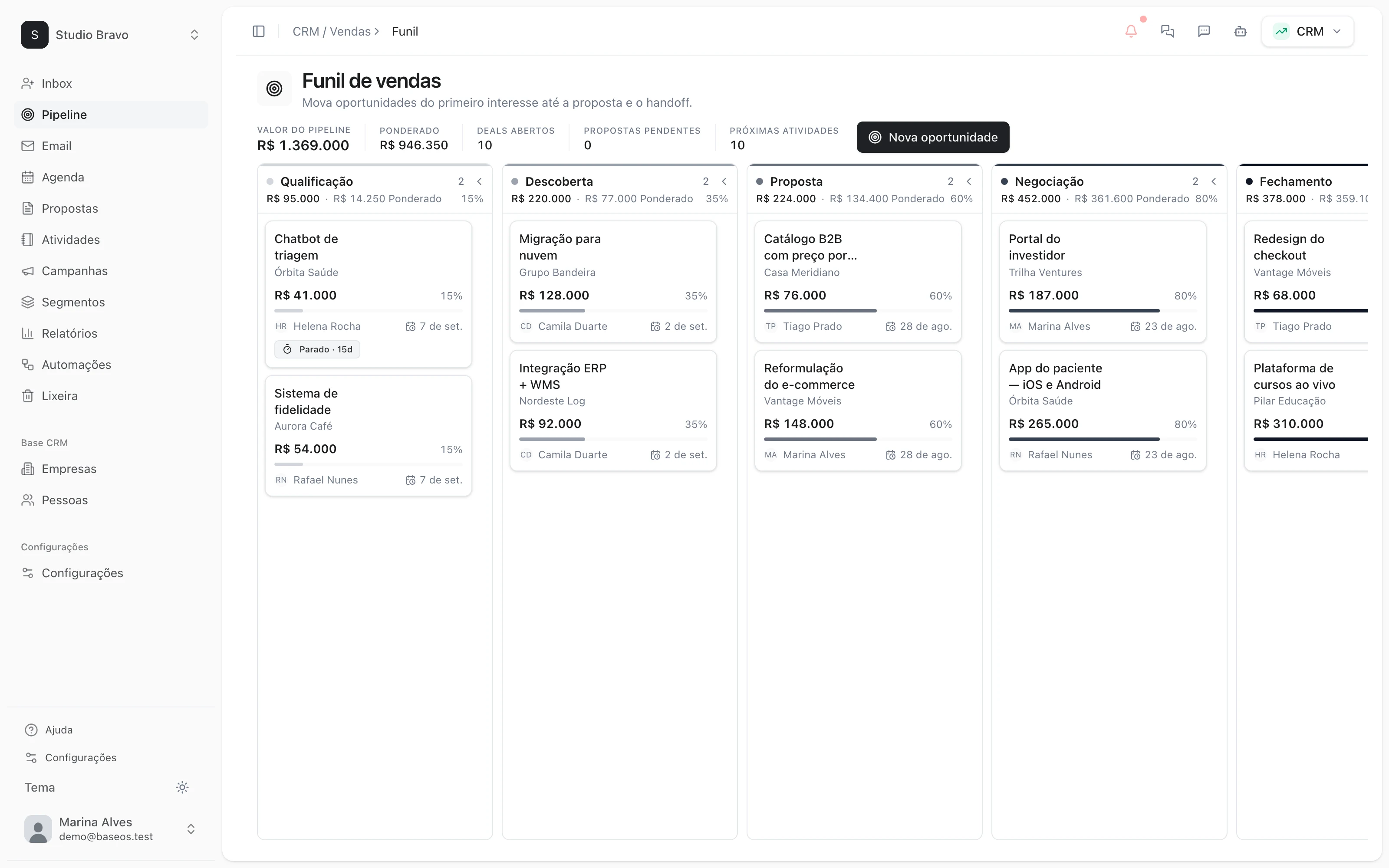
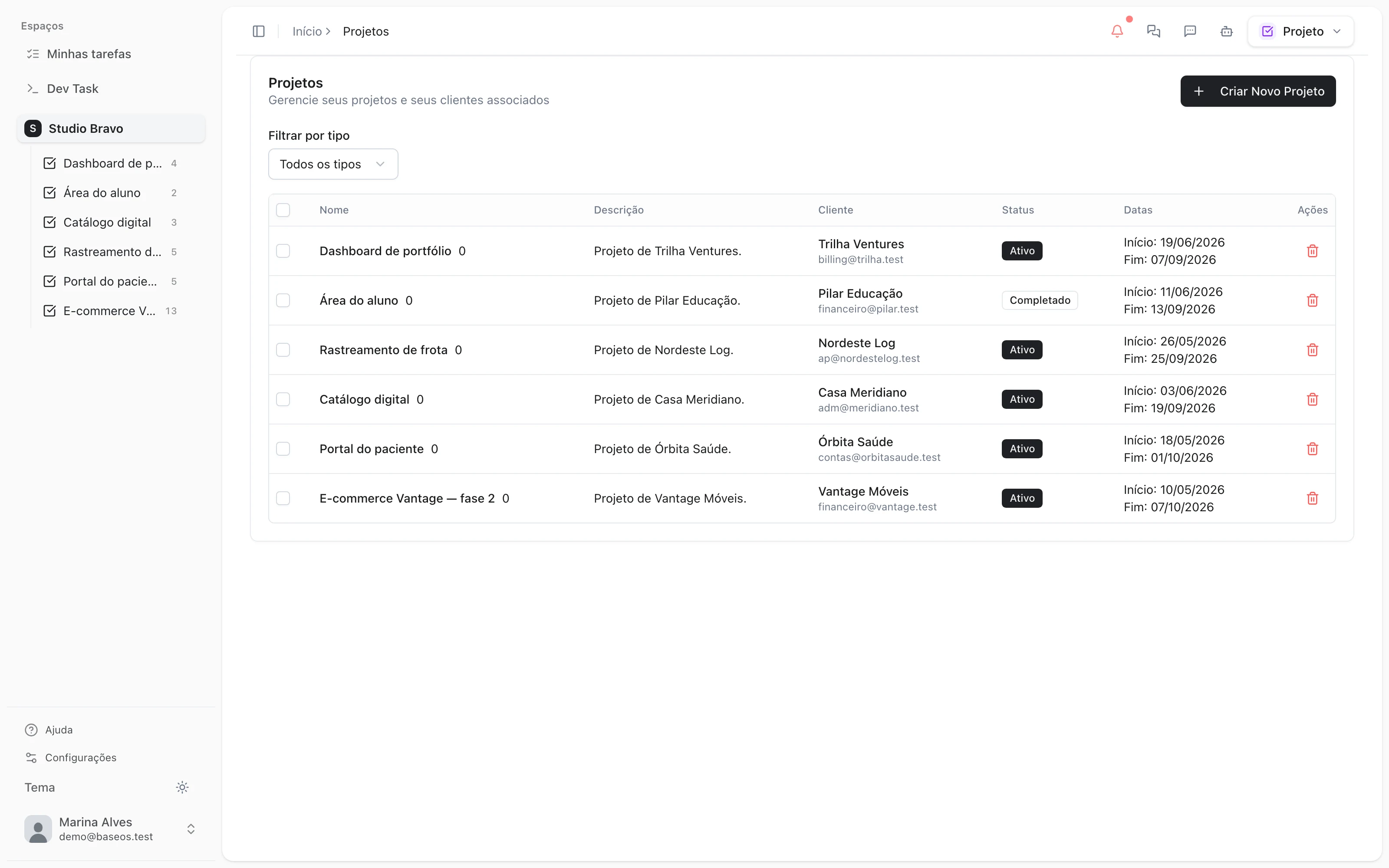
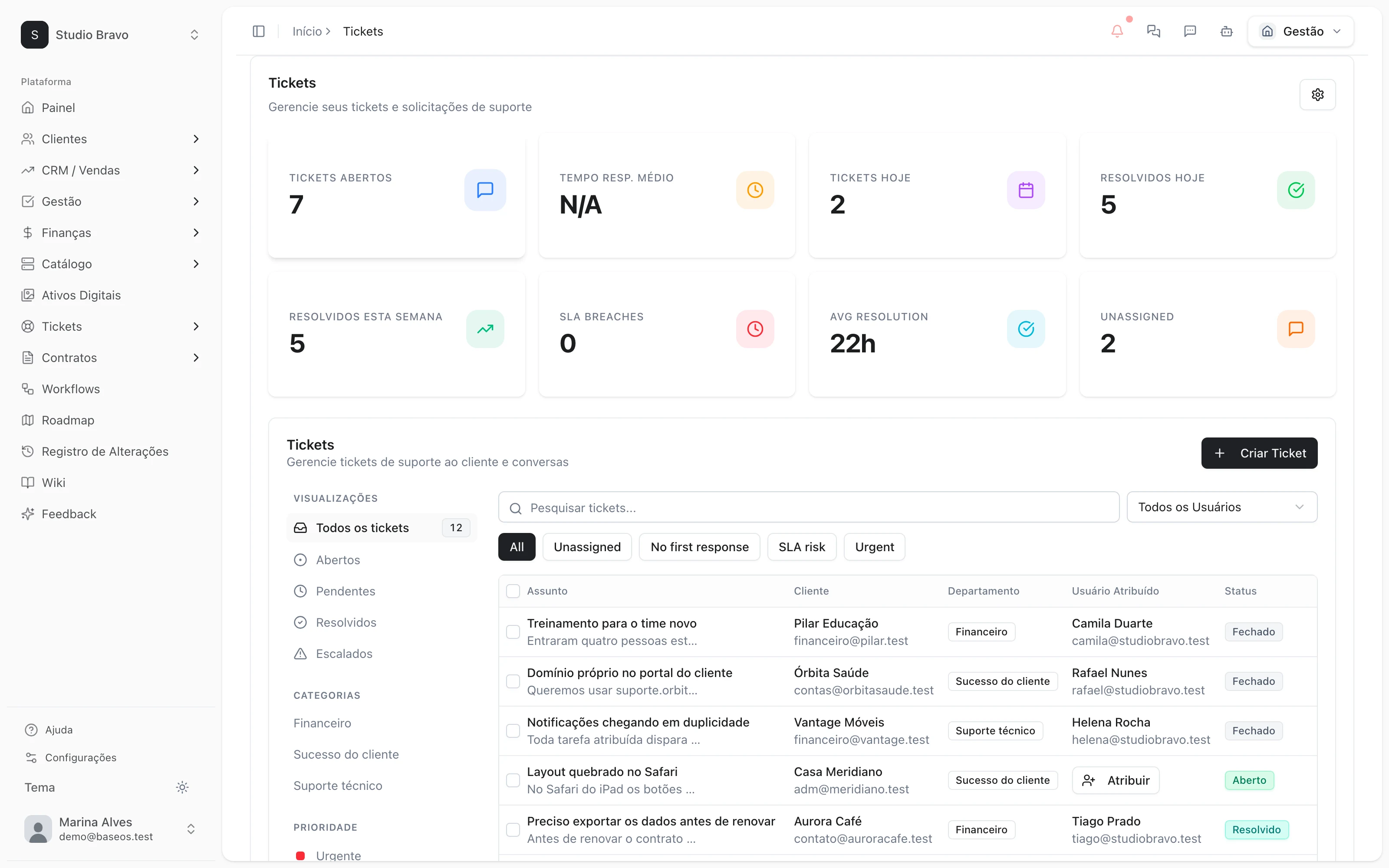
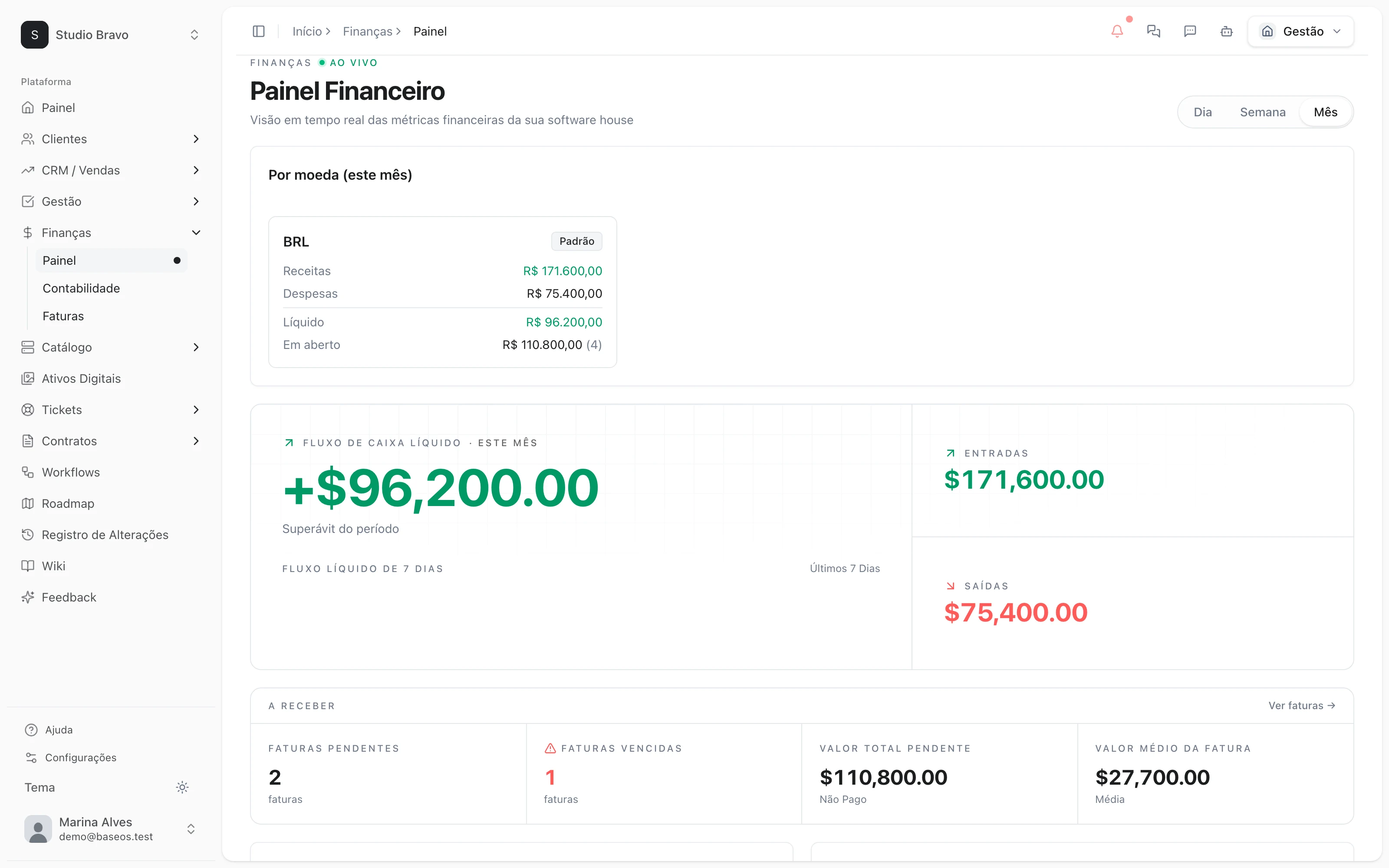
BaseOS dashboard with projects, clients and this month's revenue

01

CRM

02

Projects

03

Support

04

Finance

05

Marketing

The platform, connected

Your whole business. Built on the same foundation.

Sales, projects, support, marketing and finance. Connected from the start, with AI working on the same information as your team.

Explore the modules›
The connected layers of BaseOSA shared data foundation supports the five business modules. AI agents work across these modules with the same context. Your team, clients and channels connect to this platform.Your teamClientsChannelsPermissions · historyShared dataBaseOSCRMProjectsSupportFinanceMarketingAI agents
One platform. The same context at every layer.

One shared foundation

Clients, contracts and history. Record it once; every area works from it.

Connected business areas

From the first lead to payment, without re-entering the same information.

AI with business context

Agents work with your data, within your permissions, with every action recorded.

§01

which of these is you?

Start with the work that depends on you today.

See how to connect handoffs, organize your team’s work or bring customer support together.

Software house · agency

“I am the integration between my own tools.”

The proposal lives in one place, hours in another, the invoice gets retyped at month-end. Every hand-off between areas is you copying from one screen to another.

§02See the workflow›

Service business

“If I take a week off, the operation stops.”

Deadlines, tasks and client history depend on your messages. Your team needs a place to see what comes next and who owns it.

§04See projects and follow-up›

SaaS · digital product

“I'm building backoffice instead of product.”

Support and client history are spread across tools. You need to connect them without building every piece from scratch.

§04See support and the portal›
§02

an example: from proposal to delivery

Stop starting over at every handoff.

An accepted proposal can become a project, contract or invoice. Your team chooses the action and reuses the information already recorded.

today

When tools are separate, someone has to transfer client details and the agreed scope for the work to continue.

  1. Lead in the inbox
  2. ↓Proposal in a doc
  3. ↓Project in a board
  4. ↓Hours in a spreadsheet
  5. ↓Invoice retyped by hand

Information entered again

with BaseOS

Convert an accepted proposal into a project, contract or invoice as needed. Conversion requires the Commercial Pro tier and the destination modules to be enabled.

Lead
↓

Shared information

client and proposal details ready for the next step

ProposalProjectHoursTicketInvoice

Conversion using existing information

§03

what is included and how billing works

Start free. Expand when you need to.

Try BaseOS for 14 days with your first organization. If you do not subscribe, you continue on the free plan and your data is retained.

free plan

  • Support, Commercial and ProjectsFree tier
  • Product pagesFree tier
  • Users2
  • Storage1 GB
Monthly subscription0

build your subscription

  • ModulesYour choice
  • Module tiersBy features
  • Users and storageBy quantity
  • AI usageCredits
Monthly amountVaries

The free plan includes the free tiers of Support, Commercial, Projects and Product. A paid subscription combines your selected modules and tiers with purchased user, storage and record quantities. AI uses credits. Review the prices for your selection in Settings → Modules before subscribing.

§04

from first contact to payment

Each team picks up where the last one left off.

Sell, organize delivery, support clients and review your finances. Available features depend on the modules and tiers you activate.

Start for free›
From first conversation to signed contract

CRM

From first conversation to signed contract

View proposals alongside client details. With Commercial Pro conversion, you can create a project, contract or invoice from an accepted proposal.

  • Pipeline with weighted value and next action
  • Proposal conversion with Commercial Pro
  • Next actions and opportunity follow-up
The work and the hours in the same place

Projects

The work and the hours in the same place

Every task carries the project, the client and the hours. What's late shows up before the client calls, and the month doesn't need to be rebuilt in a spreadsheet.

  • Board, list, calendar and Gantt on the same data
  • Billable hours by project and by client
  • Templates to repeat what already worked
The ticket knows which client and contract it came from

Support

The ticket knows which client and contract it came from

One queue with SLAs, a portal with your brand, and a widget to embed in your own product. Support moves off someone's personal WhatsApp and into the company.

  • One queue with SLA and departments
  • Client portal and embeddable widget
  • A ticket that becomes a task with no copy-pasting
Closing the month stops being a project of its own

Finance

Closing the month stops being a project of its own

Invoices, payments, contracts and cash flow come out of work that's already recorded. The number you look at is the same one your team produced.

  • Invoices generated from project hours
  • Contracts that turn into access and hours automatically
  • Money in, money out, and margin by project
Leads enter the same pipeline, with a source

Marketing

Leads enter the same pipeline, with a source

Landing pages, forms and campaigns feed the CRM directly. You stop deciding where to spend by gut feel — and the cycle starts over.

  • Pages and forms that capture straight into the CRM
  • Campaigns with source and attribution recorded
  • A media library shared with the team
§05

AI for each team’s work

Ask for help with the work in front of you.

Look up information, prepare content and request actions through chat. Execution depends on the available tools, permissions and agent configuration.

Sales

Ask it to look up opportunities and help prepare your next follow-up.

Support

Get help responding to a ticket using client context and the available knowledge base.

Projects

Ask it to look up tasks and summarize project progress for your team review.

Finance

Look up recorded invoices and transactions to review your financial position.

Marketing

Request content drafts and help with the marketing tools you have enabled.

CRM

Look up client details and ask for help reviewing or updating their record.

Operations

Ask about information available across teams to inform your decisions.

Chat responds to your requests. Scheduled tasks need configuration; actions subject to approval wait for confirmation. AI uses credits.

§06

how you get in

Start on your own or with guidance.

Create an account to explore the product or book a conversation about what your operation needs.

Book a diagnostic call›

01

Create an account and turn on a module

Create your first organization and use the 14-day trial to evaluate a specific workflow with your team.

02

Or book a diagnostic conversation

We review your operation, the modules you need and the scope of our help. We agree on which data to bring and how to move it before getting started.

03

One module at a time

Evaluate one area before expanding. Decide which work will move to BaseOS and which will stay in your current system during the transition.

§07

what if it doesn't work out

Understand the terms before getting started.

See security and privacy›

Your data leaves whenever you want

Full export at any time, no permission required and no exit fee. Staying has to be a choice, not a trap.

No lock-in, no penalty

Cancel whenever you want. There's no twelve-month contract holding on to someone who's already decided to leave.

Access through roles and permissions

Configure who can access each area of your organization. Review security and privacy details before bringing your data.

Open founding beta

Built by a software house that lived this exact chaos. Join now and you shape what gets prioritized.

§08

before you ask

Before you start

Didn't find yours? Talk to us.

Talk to a person›

BaseOS is designed for teams that need to connect sales, delivery and billing. Evaluate the features you use daily: if you need a specialized tool, check whether BaseOS covers that work before replacing it.

next step

Keep work moving from one team to the next.

Try a workflow with your team for 14 days or book a consultation to decide where to start.

Start for free›Book a diagnostic call

Trial for your first organization · No card required · Free plan afterward

BaseOS

The operating system for your entire operation: management, projects, CRM, support, and marketing, with AI by your side.

Product
  • Modules
  • Use cases
  • AI agents
  • Pricing
Company
  • About
  • Contact
  • Developers
  • Security
  • Log in
Legal
  • Terms
  • Privacy

© BaseOS. All rights reserved.

baseos · v3

The founding beta is openThe founding beta is open — come in early and help shape BaseOS

Get started›
BaseOS
Partners
Log inStart free