
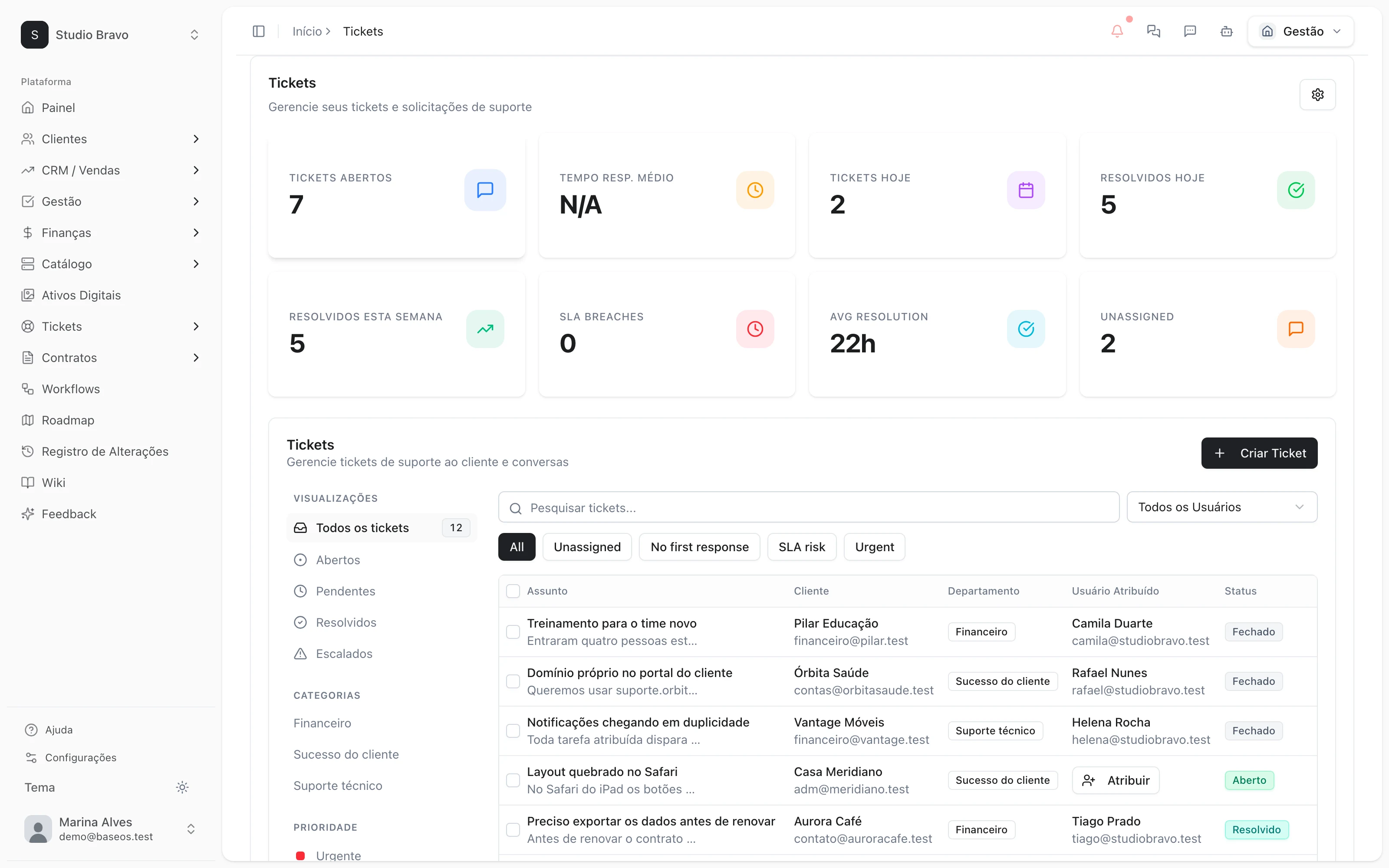
Ticket opened, answered from your wiki.
Sara reads every incoming ticket, finds the answer in your knowledge base and shows the source. Whatever she can't back up goes to a person, with the summary ready.
14-day trial · No card · Then a free plan
Sara, Support: “What came into the support queue today?”
7 tickets. Lumen's asks how to reset the portal password, and the wiki article answers it. Shall I send the reply with the article link? Reply to Lumen's ticket with the wiki article. Replied. Acme's is about a duplicate charge — I passed it to Finance with a summary of the conversation.
Studio Bravo is a demo company. Made-up data.
The support queue, before and after
The same question is answered from scratch ten times a week.
The agent finds the article that answers it and writes the reply citing the source.
The ticket lands in the general queue and waits for someone to grab it.
It goes to the right department and is assigned round-robin or to whoever has the fewest tickets.
An urgent ticket blows its deadline and nobody noticed.
Response and resolution deadlines are tracked, with an alert before they run out.
The AI makes up an answer rather than say it doesn't know.
Without a verified source, she doesn't reply: the ticket goes to a person with the reasons.
How it works
From the incoming ticket to the customer helped — four steps, and you decide how much the agent can answer on her own.
1 · Intake
The ticket comes in and goes to whoever solves it
The customer opens a ticket in the portal, by email or from a conversation. AI triage reads the request and routing sends it to the right department.
- Support portal for the customer
- Support email that becomes a ticket
- Departments with round-robin or shortest queue
2 · Answer
Sara answers from your wiki
She searches your knowledge base articles and past resolved tickets, and writes the reply citing where each point came from. You review and send — or let her reply on her own when she has a source.
- Every reply with its source cited
- Drafts the team reviews before sending
- Automatic replies only with a verified source
3 · Escalation
What she doesn't know goes to a person
With no source, low confidence or another customer's data in the way, the reply becomes a draft and the ticket goes to a person, with the reason written down. The deadline keeps counting, with an alert before it runs out.
- Handoff to a human with the summary ready
- First-response and resolution deadlines
- An alert before the deadline runs out
4 · Afterwards
Every answer teaches the next one
Once the ticket is resolved, the customer rates it from 1 to 5, and low scores alert the team. What the agent couldn't answer becomes a draft article for you to review and publish on the wiki.
- A 1–5 rating on resolution
- Low-score alert for the team
- Knowledge gaps become draft articles
Support that already knows who the customer is
- From wiki to answerThe same knowledge base you publish for customers is the source of the agent's answers.
- From ticket to financeThe agent sees the customer's invoices and contract and passes billing questions to whoever owns them.
- From ticket to portalIn the portal, the customer opens a ticket and follows the reply without asking on WhatsApp.
Modules you can switch on today
Read from the same catalog as the module store: if it's listed here, it's in the product.
- Ticketsfree plan available
- Support portalA support portal where the client opens and follows their own tickets.
- SLAFirst-response and resolution deadlines, with an alert before they blow.
- Autonomous AI agentThe AI answers customers on its own when the reply rests on verified sources, and hands the ticket to a person when it does not.
- Roadmap, Changelog & Wikifree plan available
- RoadmapA public product roadmap showing what is in flight and what comes next.
- ChangelogA release changelog to announce every delivery to your users.
- WikiA knowledge base and documentation, internal or public.
Will the AI tell my customer something wrong?
She only replies on her own if you turn that mode on, and even then only when the answer rests on a verified source. With no source, it becomes a draft and the ticket goes to a person.
Can I start with drafts only?
Yes. The agent writes the reply and the team reviews it before sending. Automatic replies are your choice, on a level of the tickets module you see before you sign up.
My wiki is small. Does it still work?
It works with what's there, and the gaps show: what the agent couldn't answer becomes a draft article for your team to complete.
Will the customer know they talked to an AI?
Every reply from the agent is marked as hers on the ticket, with its sources. You see everything in the history and decide how to present her to your customer.
Be the owner again.Not the integrator.
Start with the area that hurts most. In 14 days you'll know whether BaseOS stays — no card, and a free plan afterward.
14-day trial · No card · Then the free plan