
Customer support, with no forgotten ticket.
Tickets from the portal, the widget and email in one queue, with department, deadline and the customer's history. Sara drafts the answer from your wiki — and asks before she sends.
14-day trial · No card · Then a free plan
Sara, Support: “Any urgent tickets?”
Two breach their SLA in 1 h. For Lumen's, I drafted the answer from the wiki article; the other one needs you. Shall I send Lumen's? Reply to Lumen's ticket. Sent. The ticket is now awaiting the customer, and the other one is assigned to you.
Studio Bravo is a demo company. Made-up data.
The support queue, before and after
Requests come in by email, WhatsApp and phone, and everyone writes them down wherever they can.
Portal, widget and support email become tickets in one queue, with each customer's history.
The ticket lands in the inbox of someone who can't solve it and stays there.
The ticket goes to the right department and is assigned round-robin or to whoever has the fewest open.
The deadline is missed and someone finds out when the customer complains.
First-response and resolution deadlines, with an alert before they run out.
The same question is answered from scratch every week.
The agent drafts the answer from the wiki, and the team reviews it before sending.
From request to resolution, in one queue
A queue for the team, a portal for the customer and an agent that works from your sources.
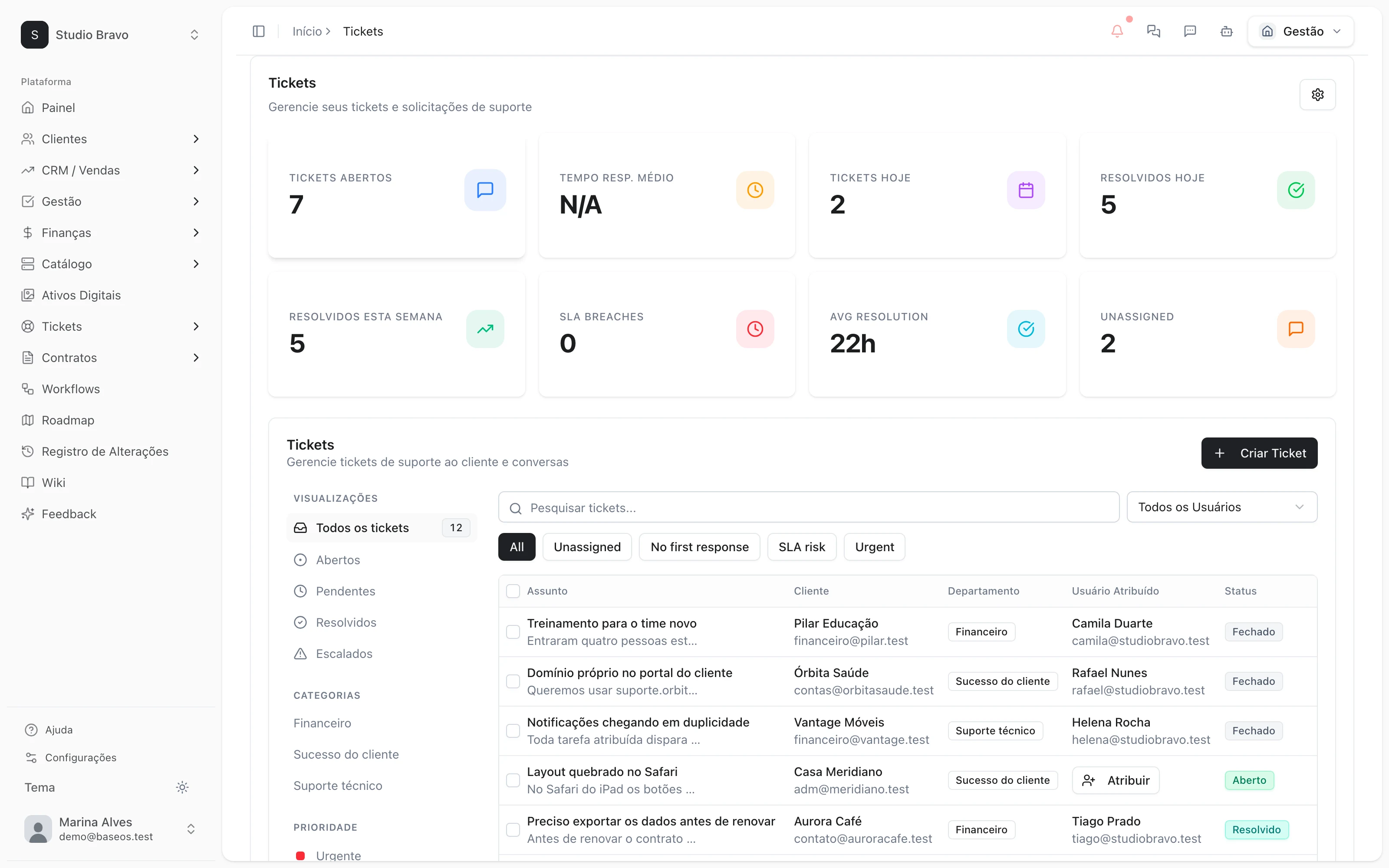
Queue
Every ticket with an owner and a deadline
Statuses, priority and history per customer. Departments take the ticket to whoever can solve it, and the SLA warns you before it's breached.
- Departments with round-robin or least-loaded
- First-response and resolution SLAs
- Your own fields per department
Portal and widget
Customers open and follow up on their own
The support portal and the ticket widget let customers open tickets and see progress without asking for a status update. Emails sent to your support address become tickets too.
- A support portal for your customers
- A ticket widget for your site or product
- Support email that becomes a ticket
AI
Drafted from your wiki, sent with your OK
The AI triages every new ticket, suggests next steps and writes drafts the team reviews. If you turn it on, it answers on its own when the answer rests on verified sources — and hands over to a person when it doesn't.
- Triage of every new ticket
- Drafts reviewed by the team
- Procedures with conditions checked in code
Quality
Know whether the customer left happy
When a ticket is resolved, the customer rates it from 1 to 5, and low ratings alert the team. Tickets the AI handled are scored against your rubric.
- A 1-to-5 rating on resolution
- An alert on low ratings
- Knowledge gaps become draft articles
Support that already knows who the customer is
- From ticket to projectA reported bug becomes a task in the project, and whoever fixes it sees the ticket it came from.
- From wiki to answerWiki articles are the basis of the agent's answers — and what's missing becomes a draft article.
- From portal to everything elseIn the same portal, customers see invoices, contracts and projects, not just tickets.
Modules you can switch on today
Read from the same catalog as the module store: if it's listed here, it's in the product.
- Ticketsfree plan available
- Support portalA support portal where the client opens and follows their own tickets.
- SLAFirst-response and resolution deadlines, with an alert before they blow.
- Autonomous AI agentThe AI answers customers on its own when the reply rests on verified sources, and hands the ticket to a person when it does not.
Does the AI answer customers without me seeing it?
Only if you turn it on. By default it triages and drafts, and the team sends. In automatic mode it only answers when it rests on verified sources and hands the ticket to a person when it doesn't.
Does the portal show the BaseOS brand?
On paid plans you remove the BaseOS badge from the support portal and the ticket widget.
Can I bring tickets from my current system?
If you're coming from WHMCS, you can import clients, orders and tickets. From other systems, book a diagnosis and we'll look at it together.
Does it work for a small team?
Yes. The free plan already has the queue and the portal; departments, SLAs and AI come in as the team grows.
Be the owner again.Not the integrator.
Start with the area that hurts most. In 14 days you'll know whether BaseOS stays — no card, and a free plan afterward.
14-day trial · No card · Then the free plan