
The finance week, without chasing numbers.
Invoices, payables, bank statements and contracts on the same base your sales and hours come from. Luna tells you what's due and what hasn't been sent — and asks before sending.
14-day trial · No card · Then a free plan
Luna, Finance: “What's due this week?”
7 invoices are due, R$ 38,200 in total. Acme's, for R$ 9,600, hasn't been sent to the client yet. Shall I send it now? Email the invoice to Acme. Sent. It's logged on the invoice and on Acme's history.
Studio Bravo is a demo company. Made-up data.
The week of whoever minds the cash, before and after
To know what's coming in this week, someone opens the billing spreadsheet and the inbox.
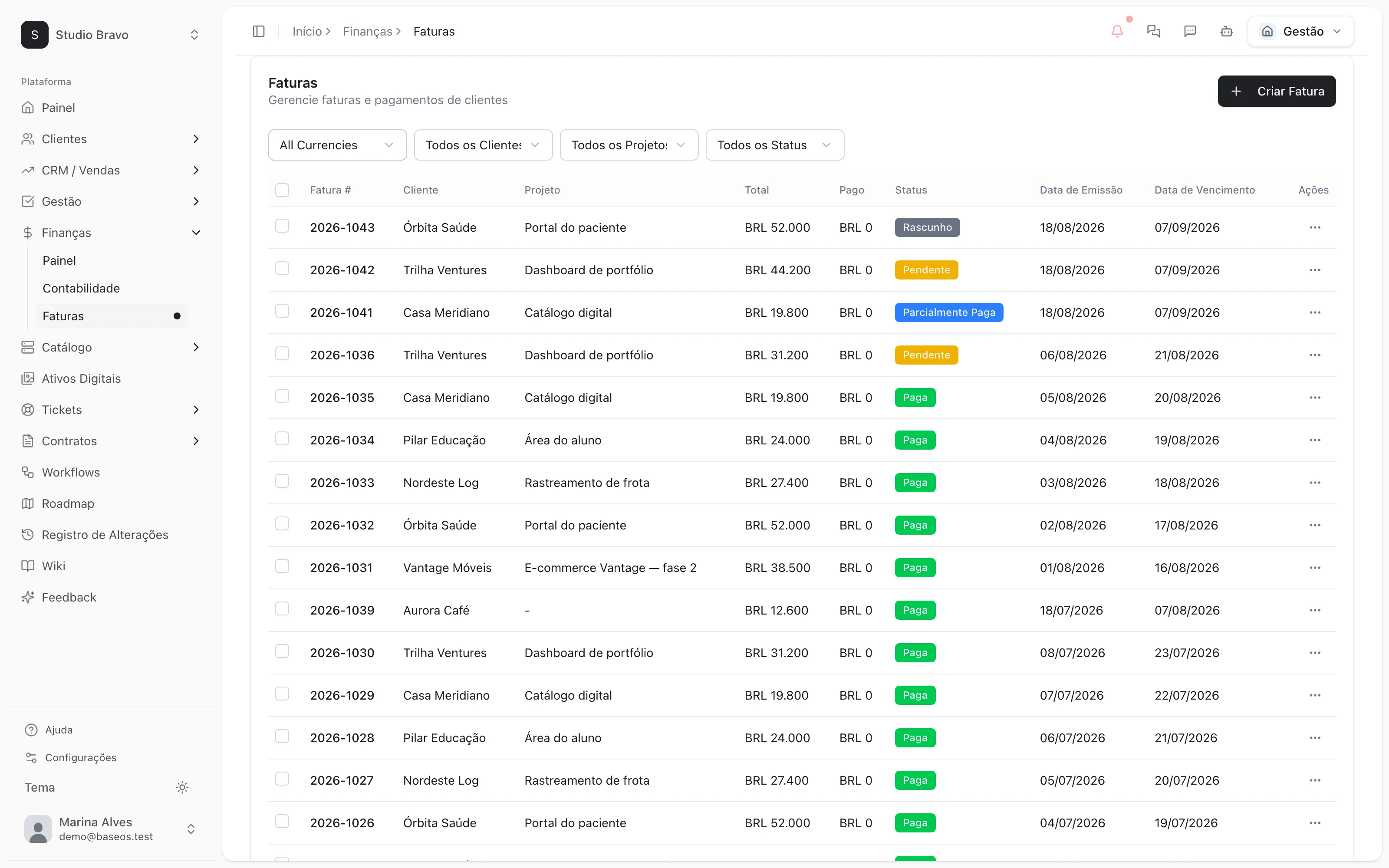
Open invoices show by due date and by client, on one screen.
The bank statement is checked line by line against the spreadsheet.
The statement comes in by CSV or OFX and is reconciled with the entries.
The client paid by Pix, and someone has to remember to mark it.
With your Asaas account connected, a paid charge marks the invoice as paid.
Billed hours don't match the hours operations says it worked.
Only manager-approved hours reach the invoice — the same number on both sides.
The week's work, one block at a time
From Monday's cash check to the month-end close.
Monday
What comes in and what goes out
Open invoices per client on one side, payables by supplier and due date on the other. Recurring bills don't have to be entered again every month.
- Open balance per client
- Payables with a calendar
- Recurring bills per supplier
Collect
Get paid without chasing anyone
Record partial payments and follow what's open. The agent finds what's overdue and writes the reminder; nothing goes out without your OK.
- Partial payments per invoice
- Pix, boleto and card through your Asaas account
- Reminders that wait for your approval
Reconcile
The statement matches the invoice
Import your bank statement and reconcile income and expenses with what was billed and paid, with a balance per period.
- Statements by CSV or OFX
- Reconciled income and expenses
- Balance per period
Close
The month closed without building a report
Income statement and balance sheet come from the entries. Budgets per cost center show planned against actual, and KPIs alert you when they cross the line.
- Income statement and balance sheet
- Budget against actual
- Alerts when a metric crosses the target
Finance that doesn't need to ask anyone
Modules you can switch on today
Read from the same catalog as the module store: if it's listed here, it's in the product.
- Financefrom R$39/month
- InvoicesIssue invoices, record partial payments and track what is outstanding per client.
- AccountingIncome and expense entries reconciled with your invoices, with a balance per period.
- Contractsfrom R$58/month
- ContractsContracts as data: number, value, term and renewal terms, immutable versions and multi-party e-signature with an evidence certificate.
- Contract-to-cash billingOnce signed and in force, the contract generates its own invoices on schedule — and every invoice knows which contract it came from.
- Renewals & adjustmentsRenewal, IPCA/IGP-M adjustment, amendments and termination change billing and provisioning, with alerts before the notice deadline.
- Insights & KPIsfrom R$29/month
- KPI dashboardA daily series of the metrics you subscribe to, with cards and charts you arrange yourself.
- Holding panelSee the same metric across every organization you administer, in one chart.
- BreakdownsBreak a KPI down by department, stage or currency instead of a single total.
Does it issue tax invoices?
We don't promise Brazilian NFS-e issuing today. The catalog keeps each item's tax profile and copies it to the invoice — talk to us before you count on issuing.
Does the agent touch the money?
No. She checks, prepares the invoice or the reminder and stops. Nothing goes out before your OK, and every action is logged.
Do I need to change bank or payment gateway?
No. Statements come in as files from any bank. To charge by Pix, boleto and card, you connect your own Asaas account.
Can my accountant use it?
Reports export per area as CSV, and the REST API gives access to the data. If your accountant needs a specific format, talk to us.
Be the owner again.Not the integrator.
Start with the area that hurts most. In 14 days you'll know whether BaseOS stays — no card, and a free plan afterward.
14-day trial · No card · Then the free plan