
A demo recorded once, that presents itself.
The visitor watches, asks the agent beside the video and answers at the demo's pace — and the answers land in the CRM. Alex sets up the room; publishing is up to you.
14-day trial · No card · Then a free plan
Alex, Sales: “Set up a demo room with the portal tour video from the library. The .vtt captions are attached.”
I built the draft with the “Client portal tour” video and your captions. At the start I ask for name and e-mail; at 60%, team size, and the video pauses until they answer. The “Book a call” button shows from halfway on and carries the name and e-mail in its link. I answer questions beside the video. The publication check passed — shall I publish? Publish the “Client portal tour” demo room. Published. The public link is live: every visit becomes a session on the panel, and the answers go into the CRM.
Studio Bravo is a demo company. Made-up data.
The demo, before and after
The seller gives the same live demo to every lead.
The demo is recorded once, and an agent answers questions beside the video.
The video sits behind a loose link, and nobody knows who watched or how far.
Every visit is a session: how much they watched, what they answered and which button they clicked.
A long form before the video scares the visitor away.
Questions appear along the video: little at first, the rest once they're interested.
Answers sit loose in a sign-up spreadsheet.
They write straight to the lead's record and the CRM fields.
How it works
One video, one agent, the right questions at the right moment — and a panel of what happened.
1 · Video and agent
A demo that answers questions
Pick the video from your media library and upload its timed captions. The agent reads the whole demo, knows which minute the visitor is at and what they've already answered — and promises nothing that isn't in the video or the company's knowledge.
- Video from your media library
- An agent that knows where the visitor is in the video
- Chat beside the video or behind a floating button
2 · Questions
Ask a little at a time
Each group of questions appears at a point in the video — below it, over it or full screen — and can pause the demo until answered. The fields are the CRM's, and the lead is created when the visitor gives an e-mail or phone.
- Questions at the right point in the video
- Answers in the CRM fields
- Lead created when the visitor identifies themselves
3 · Next step
Buttons that carry the answers
Up to two buttons, each showing from a point in the video. The link can carry the visitor's answers as parameters, so the next step arrives pre-filled. The agent points to the button by name instead of writing the link.
- Up to 2 buttons, each with its moment
- Links filled in with the answers
- The lead's internal id never goes in a link
4 · Panel
Who watched, and how far
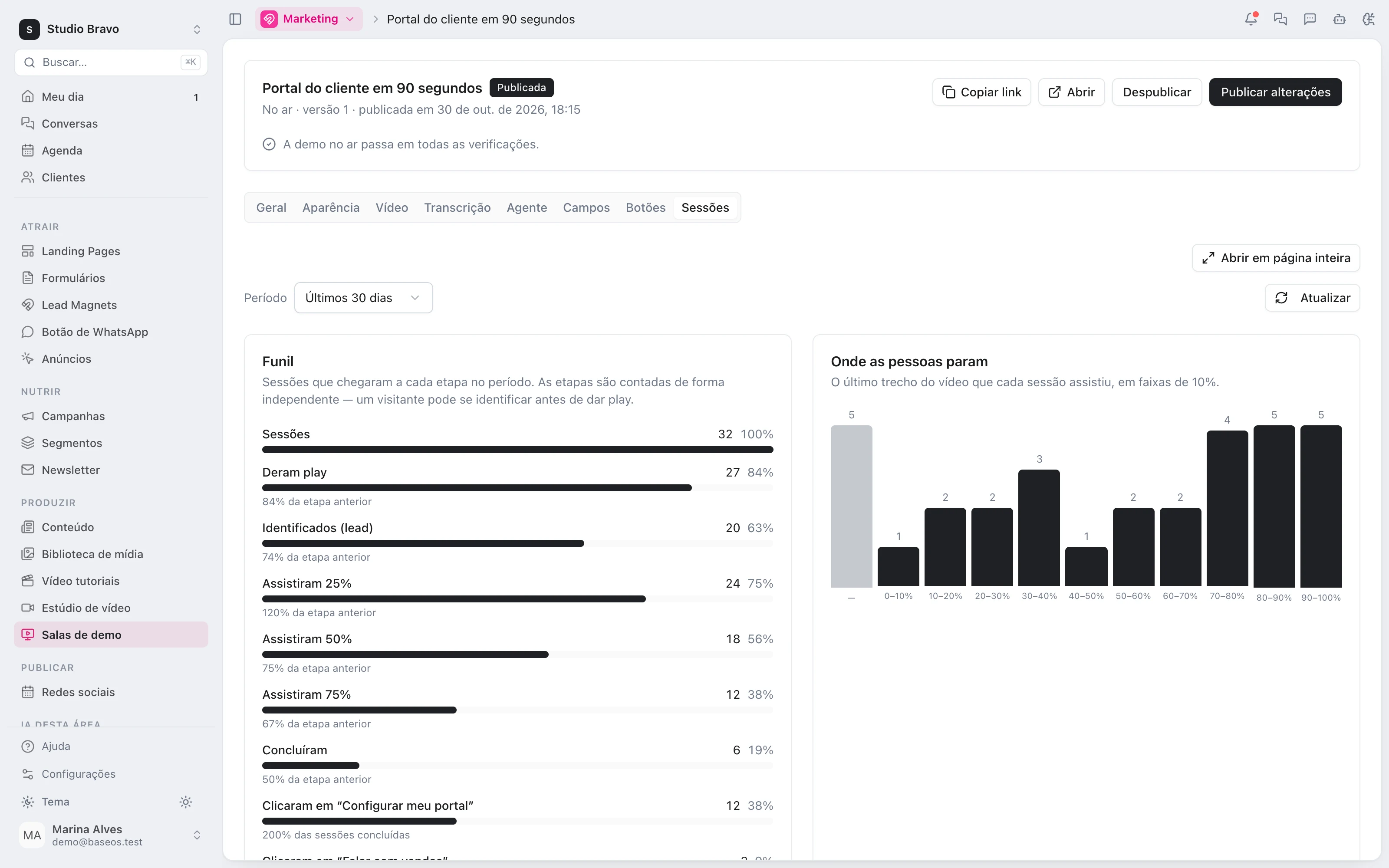
The team sees every session: lead or anonymous, how much they watched, what they answered, their clicks and the conversation with the agent. The funnel goes from play to click, by period, and shows where in the video people stop watching.
- Sessions with answers and conversation
- Funnel from play to click
- Where people stop watching
A demo that already talks to the rest of the base
- From demo to qualified leadWatching, answering and clicking land on the lead's timeline and count toward the engagement score.
- From website chat to demoThe agent answering in the demo is one of the company's agents, with the same knowledge as the website chat.
- From demo to proposalWhen the demo's lead becomes an opportunity, the visual proposal comes from the same system.
Modules you can switch on today
Read from the same catalog as the module store: if it's listed here, it's in the product.
- Demo roomsfrom R$97/month
- Video demo with live agentPublish a page where your video plays next to your AI agent, who answers questions about what is on screen.
- Progressive CRM fieldsAsk for details at chosen moments of the video and save the answers straight into the lead's CRM record.
- Demo funnel and sessionsSee every visit, how much was watched, what was answered and where people dropped off.
Does the agent publish the demo on its own?
No. Alex builds the draft, asking for confirmation at each change, and publishing waits for your approval. Once it's published, any change goes through you too.
Can I make a different demo for each client?
No: a room is one page, the same for every visitor. What changes per person is the conversation with the agent and the buttons' link, filled in with their answers.
Can someone on the team join the conversation?
Not yet. On the panel, the team reads each session's conversation, but the agent is the one answering in the demo.
What do I need to subscribe to?
The demo rooms module, which has a single plan. It uses the media library for the video and the CRM for leads and fields. The timed captions are yours: they're where the agent learns what the video shows.
Be the owner again.Not the integrator.
Start with the area that hurts most. In 14 days you'll know whether BaseOS stays — no card, and a free plan afterward.
14-day trial · No card · Then the free plan