
A proposal that looks good, approved by link.
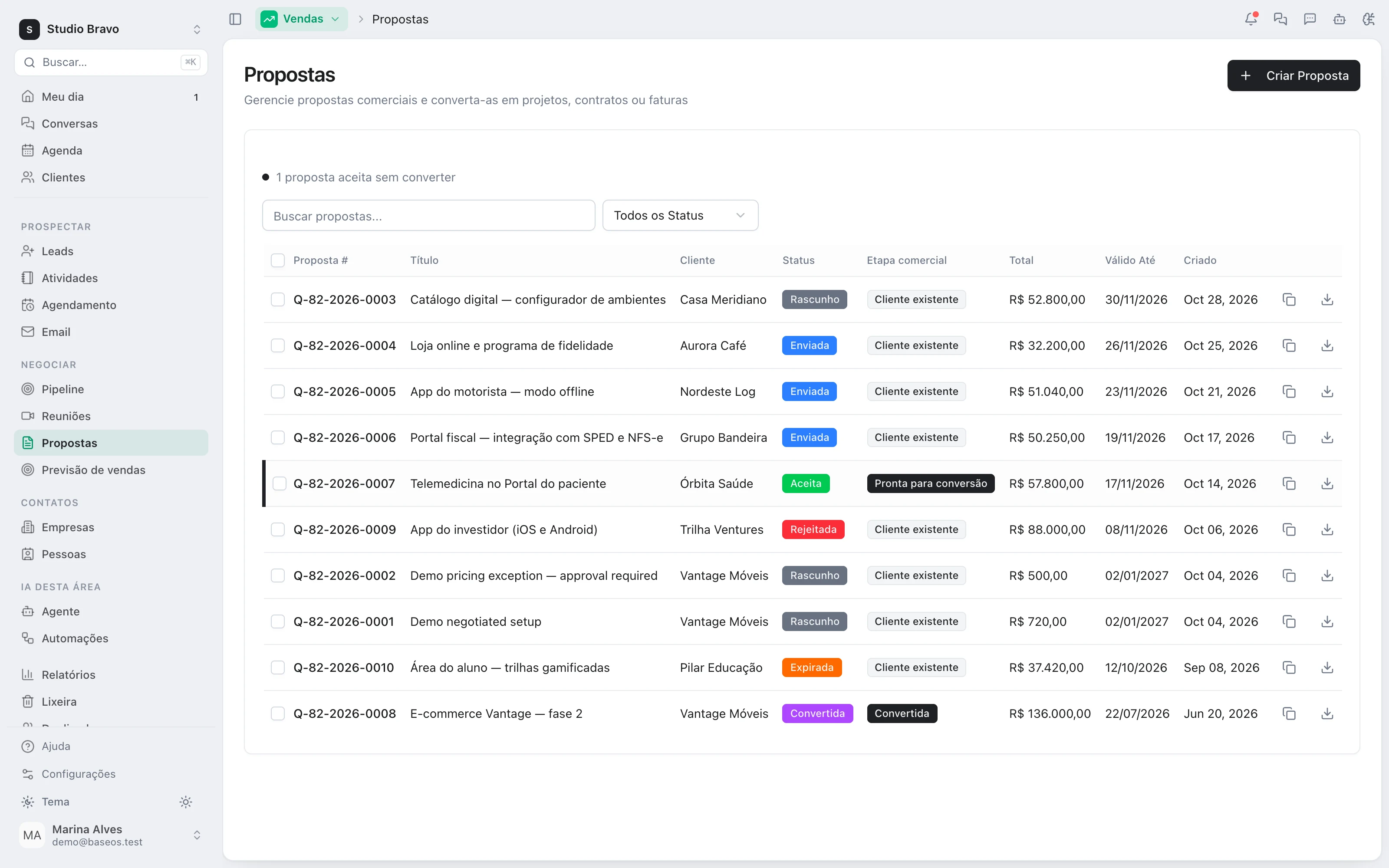
The quote gets a presentation document, with the price table on the last sheet. The client reads it on their phone and accepts right there — and Alex drafts it for you to review.
14-day trial · No card · Then a free plan
Alex, Sales: “Can you prepare Casa Meridiano's proposal for me to review?”
I created the document from the quote: challenge, scope with the 4 items, timeline and next steps. The R$ 52,800 table goes on the last sheet, valid until 11/30. Once you've reviewed it, shall I make the link live? Mark Casa Meridiano's proposal as sent. Done. The link now shows the proposal with the accept button. I don't e-mail anyone for you: copy the link and send it the way you usually do.
Studio Bravo is a demo company. Made-up data.
The proposal, before and after
The proposal is a PDF built somewhere else, redone at every discount.
The document is born from the quote, and the price table on the last sheet comes from its lines.
The client opens an attachment on their phone and can't find the price.
They open a link that reads well on a phone, with the price on the last sheet and the accept button on top.
“Go ahead” on WhatsApp, and nobody knows which version was approved.
The acceptance records name, e-mail, date and the exact version, frozen.
March's proposal is still standing in July.
Validity is real: an expired proposal can no longer be accepted.
How it works
From the draft to the client's yes — the document, the link, the acceptance and what happens before it goes out.
1 · Document
A proposal that looks like a proposal
The quote gets a presentation document that starts with the client, the scope, the total and the validity. The sections — the challenge, what you propose, timeline, why you — are there to rewrite, not to fill in from scratch.
- Born with the quote's data
- Edited as a document, not a form
- Price table on the last sheet, on its own
2 · Link
Opens without an account, reads well on a phone
The client gets a link, not an attachment. The proposal shows as sheets, with the accept button on top. The PDF they download is the same page they see, and the link stays out of search engines.
- No login for the client
- A PDF identical to the screen
- No BaseOS badge with white label
3 · Acceptance
The yes is on record
To accept, the client enters name and e-mail and confirms they agree. The total and lines at that moment are frozen, the deal owner is notified and the acceptance lands on the timeline. They can also decline through the same link.
- Name, e-mail and explicit agreement
- Total and lines frozen on acceptance
- An expired proposal can't be accepted
4 · Before it goes out
Reviewed before it reaches the client
A price outside your discount policy keeps the link closed until someone approves it. Before changing a proposal that was already sent, save the current version. Alex builds the document; you decide when it goes out.
- Off-policy prices go out only once approved
- Numbered versions before every change
- The agent prepares, you send
The proposal in the middle of the flow, not in a folder
- From lead to proposalThe opportunity qualified in the CRM is the same one that gets the proposal, and the acceptance shows on its timeline.
- From yes to project and invoiceThe accepted proposal becomes a project, a contract and an invoice with the same lines, nothing retyped.
- From yes to welcomeOnce the client signs on, the welcome and kickoff routine starts in the same system.
Modules you can switch on today
Read from the same catalog as the module store: if it's listed here, it's in the product.
- Quotesfree plan available
- QuotesQuotes assembled from the catalog, sent as a link and accepted online.
- Convert to projectAn accepted quote becomes a project, a contract and an invoice in one click, retyping nothing.
- Projects & Tasksfree plan available
- ProjectsProjects with scope, deadline, owners and the real accumulated cost.
- TasksTasks on a board or list, with logged hours drawn from the client's hour bank.
- DocumentsCollaborative documents inside the project, with no separate drive to keep in sync.
Does the agent send the proposal to the client?
No. It builds the document, and marking the proposal as sent waits for your OK. Even then it doesn't e-mail anyone: you copy the link and send it through the channel you already use with the client.
Can I tell whether the client opened the proposal?
Not yet. BaseOS records when the proposal was sent, accepted or declined — not when the link was opened.
Do I need the Projects module for the document?
Yes: the presentation document is the document editor in the Projects Pro plan. Without it, the link shows the proposal in the classic layout, with the quote's description. A link already with the client never goes down because of that.
What if I need to change the price after sending?
Save the current version and edit. The client sees the proposal as it is now; once accepted, what they accepted is frozen and doesn't change.
Be the owner again.Not the integrator.
Start with the area that hurts most. In 14 days you'll know whether BaseOS stays — no card, and a free plan afterward.
14-day trial · No card · Then the free plan