
Your company in ChatGPT, with BaseOS's rules.
Paste a URL into ChatGPT or Claude, sign in with your account and pick the agent. From then on you ask the agent from there — and it works on the real data, as you, waiting for approval in BaseOS when the action calls for it.
14-day trial · No card · Then a free plan
Alex, Sales: “How's the Órbita Saúde proposal? If it's ready, release it.”
Version 2 is ready: R$ 18,400, with the discount Marina approved yesterday. Releasing it to the client needs approval in BaseOS — shall I send the request? Release proposal v2 to Órbita Saúde. Approved in BaseOS. The proposal now shows on Órbita Saúde's link, and this conversation is in your history with Alex.
Studio Bravo is a demo company. Made-up data.
Your AI assistant, before and after
You copy numbers out of the system and paste them into ChatGPT to get an answer.
ChatGPT asks the agent, which reads the company's real data on the spot.
To act, you leave the assistant and redo everything in the system's screens.
The agent does it in BaseOS: creates the task, updates the record, prepares the proposal.
Hooking an assistant to company data means handing over a master key.
You sign in with your account and pick an agent; it sees only what you already see.
Nobody knows what the assistant did, or who authorized it.
Conversations stay in BaseOS, and what needs approval still waits for a human.
How it works
One URL, one sign-in and the agent you picked — with the same rules as inside BaseOS.
1 · Connect
One URL, no key to copy
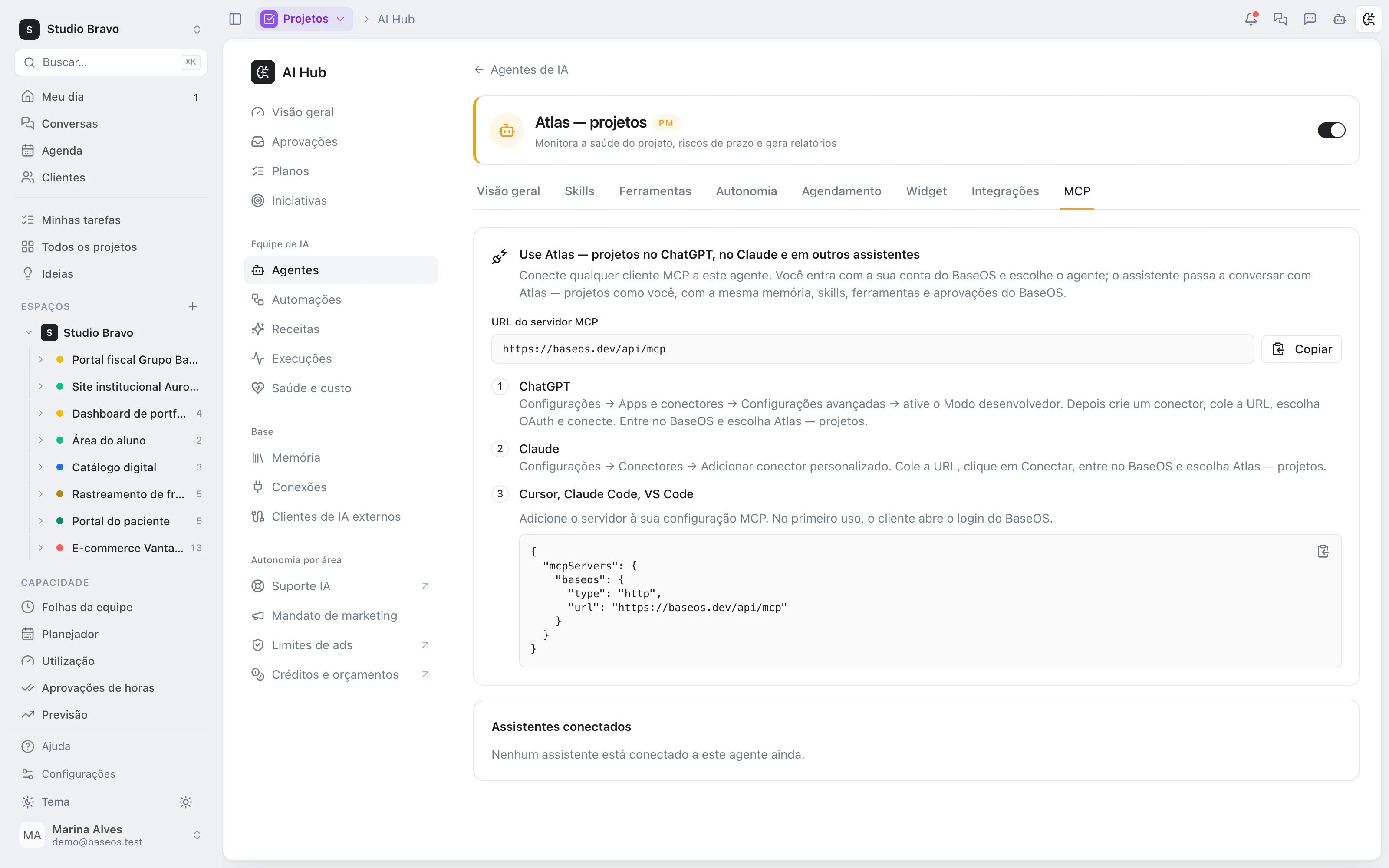
In the agent's MCP tab, copy the URL and paste it into ChatGPT or Claude as a custom connector. The assistant opens the BaseOS sign-in, you log in and pick the organization and the agent.
- Step by step for ChatGPT and Claude on screen
- Ready config for Cursor, Claude Code and VS Code
- Sign in with your account, no shared secret
2 · Ask
The agent, not a shortcut to the database
The assistant gets the agent, not its tools. The agent answers with its own memory and skills, over the modules the company has, and works as you. A long request? It says it's still working and the assistant fetches the answer later.
- Same memory and skills as inside BaseOS
- Only the company's active modules
- Conversations saved in your agent history
3 · Approve
Approval stays in BaseOS
When the agent reaches an action that needs approval, it stops. The approver is notified, and the assistant gets the link to the conversation in BaseOS. After the OK, the agent carries on and tells the assistant what it did.
- Nothing that needs approval goes out through the assistant
- A direct link to approve in BaseOS
- The agent resumes after the OK
4 · For developers
CRM data through an API key
Need data, not a conversation? Create an API key with the MCP permission and connect any MCP client. It reads and writes leads, contacts, opportunities and activities, and reads contracts — only in the active modules. Deleting the key cuts the connection at once.
- Opt-in MCP permission per key
- Tools filtered by the active modules
- Key deleted, connection gone
The same agent, wherever you are
- The agents behind the connectionEach agent has memory, skills and what it may do alone or with approval — and that's what ChatGPT finds.
- From conversation to proposalAlex builds and revises proposals in BaseOS; from ChatGPT, you just ask and approve.
- From conversation to operationsAsk the assistant how projects and tasks are going, and the agent answers with what's in BaseOS right now.
Which assistants does it work with?
The agent's MCP tab has step-by-step instructions for ChatGPT and Claude, and the config for Cursor, Claude Code and VS Code. Any MCP client with OAuth sign-in connects through the same URL — as long as your assistant plan accepts custom connectors.
Does ChatGPT get to see all the company's data?
No. It talks to the agent you picked, which sees only what you would see in BaseOS, in the modules the company has. The assistant never gets the agent's tools.
Can I approve an action from ChatGPT?
No, on purpose. Whatever needs approval stops and waits for a human in BaseOS; the assistant gets the link. That way the rule is the same wherever the request comes from.
How do I cut off access?
In the agent's MCP tab, every connected assistant shows with its last use and a disconnect button. And every call is checked again: whoever leaves the organization loses access at once.
Is it a separate module?
No. The connection comes with the agents' chat. What the agent can do depends on the modules the company has.
Be the owner again.Not the integrator.
Start with the area that hurts most. In 14 days you'll know whether BaseOS stays — no card, and a free plan afterward.
14-day trial · No card · Then the free plan