
Who's free, without a round of messages.
Each person's capacity already takes out holidays and approved time off. You book the weeks in the planner, see who's over 100% and spot what's missing before the proposal closes.
14-day trial · No card · Then a free plan
Marco, Projects: “Who has free hours in the next two weeks for Rastreamento de frota?”
Camila has 22 free hours, holiday already taken out. Tiago is at 104% next week. Shall I book 16 h of Camila's time on the project, as tentative? Book 16 h of Camila on Rastreamento de frota (tentative). Booked as tentative. The planner already shows her two weeks — confirming the booking is up to you.
Studio Bravo is a demo company. Made-up data.
Team planning, before and after
Finding out who's free means asking each person on chat.
The planner shows everyone's free hours, with holidays and approved time off already out.
Someone hits 130% and nobody knows until delivery slips.
Anyone over 100% is flagged, and the warning comes when you book.
The proposal closes and there's nobody to start.
The open proposal already books its hours as tentative; when it's won, they turn confirmed on the project.
Hours nobody reviewed end up on the client's invoice.
With approval on, only the approved week's hours are billed.
How it works
Capacity, bookings, forecast and logged hours — on the same people and the same projects.
1 · Capacity
Availability as it really is
Each person has their work schedule, the holiday calendar and approved absences. Availability is what's left — and it's what the planner, utilization and forecast use. Utilization shows worked and billable hours over that availability, per person, filterable by team and skill.
- Work schedule, holidays and approved time off
- Worked and billable utilization
- Filter by team and skill
2 · Planner
Everyone's weeks, booked
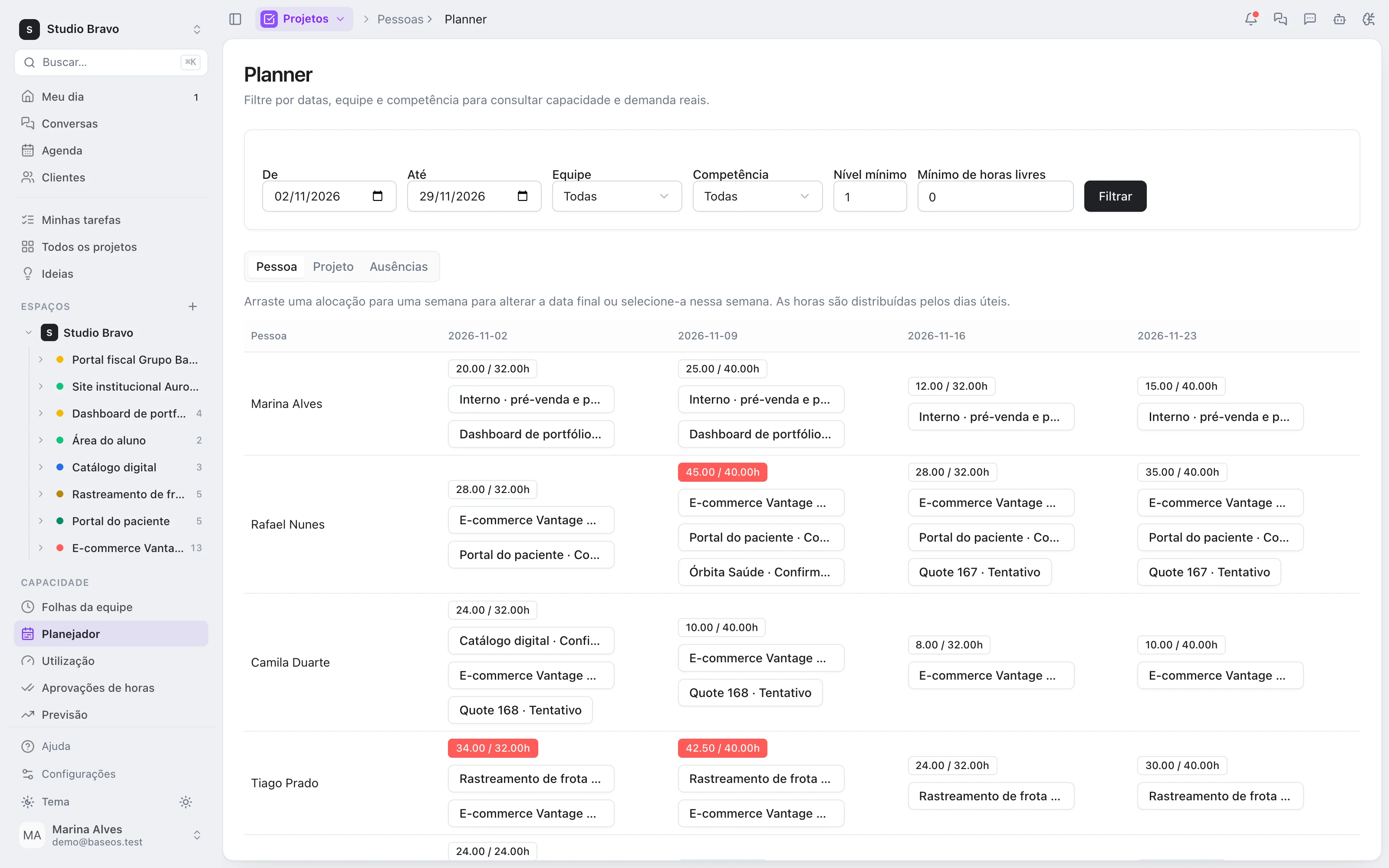
Book a person's hours for a project, a client, a proposal or internal work, as tentative or confirmed. The weekly grid shows it by person or by project, and you can drag a booking. Anyone over 100% is flagged, and when you save you see the days someone went over capacity.
- Project, client, proposal or internal
- Tentative or confirmed
- Anyone over 100%, flagged
3 · Forecast
The next 12 weeks, before you sell
The forecast compares the next 12 weeks of availability with confirmed and tentative demand — open proposals included — by team and by skill. To plan a hire, use a placeholder profile: it holds capacity in the planner and is later swapped for the person you hired.
- Available, confirmed, tentative and gap
- By team and by skill
- Placeholder profile for the opening
4 · Hours
Logged against planned
A stopwatch on the task and a weekly grid with each day's total next to that day's capacity. If you turn approval on, the person submits the week, the manager approves it, the approved week locks and only approved hours are billed. With it on, every Monday anyone who didn't submit last week gets a reminder.
- Stopwatch and weekly grid
- Week approval, when on
- Reminder for unsubmitted weeks
The same capacity for whoever sells, delivers and bills
- From proposal to bookingThe open proposal's hours book capacity as tentative — and when it becomes a project, the booking turns confirmed.
- From booking to projectWhoever is booked shows up on the project, its tasks and its time tracking, in the same base.
- From hours to the client's bankLogged hours draw down the client's hour bank — with approval on, only approved ones.
Modules you can switch on today
Read from the same catalog as the module store: if it's listed here, it's in the product.
- Resourcingfrom R$117/month
- TimesheetsA stopwatch and a weekly grid, with each day's total shown against that day's capacity.
- PlannerReserve a person's hours for a project, a client or internal work, tentative or confirmed, and see who is over 100%.
- UtilizationWorked and billable hours over real availability, per person, team and organization.
- Peoplefrom R$29/month
- Cost ratesThe total hourly cost of each person, versioned by date, so a promotion does not change past margins. Visible only with the compensation permission.
- Time offAbsence types with paid or unpaid balances, requests from the person and approval from the manager.
- Work calendarHours per weekday for each person plus a holiday calendar, so capacity is a real number.
Does the agent come ready to plan?
Not by default. An admin grants the planning tools to the agent in its tool settings. From then on it checks capacity and proposes bookings.
Does the agent book without asking?
It depends on the autonomy level you give it. At the level that asks for approval on every write, each booking waits for your OK — and even then it goes in as tentative until someone confirms it.
Does it stop someone from going over 100%?
It doesn't stop it: it warns you. Anyone over 100% is flagged in the planner and, when you save a booking, you see the days over capacity. The call stays with whoever plans.
Which modules do I need?
Capacity, time tracking, the planner and utilization are in the Resourcing Basic plan, which brings People and Projects along. The 12-week forecast, time approval and placeholder profiles are in the Pro plan.
Be the owner again.Not the integrator.
Start with the area that hurts most. In 14 days you'll know whether BaseOS stays — no card, and a free plan afterward.
14-day trial · No card · Then the free plan